National Library
Tibi App
National Library
Tibi App
National Library
Tibi App
National Library
Tibi App
National Library
Tibi App

Role
Role
Product Designer
Product Designer
Product Designer
Product Designer
Timeline
Timeline
3 months
3 months
3 months
3 months
Platform
Platform
iOS and Android
iOS and Android
iOS and Android
iOS and Android
Constraints
Constraints
Accessibility before aesthetics
Accessibility before aesthetics
Accessibility before aesthetics
Accessibility before aesthetics
The product
The product
Tibi is a library for people who have difficulty accessing written and visual information because of a disability or illness. The app is mainly used to find, borrow and listen to audiobooks and e-books.
Tibi is a library for people who have difficulty accessing written and visual information because of a disability or illness. The app is mainly used to find, borrow and listen to audiobooks and e-books.
Tibi is a library for people who have difficulty accessing written and visual information because of a disability or illness. The app is mainly used to find, borrow and listen to audiobooks and e-books.
Tibi is a library for people who have difficulty accessing written and visual information because of a disability or illness. The app is mainly used to find, borrow and listen to audiobooks and e-books.
Business goal
Business goal
The old app had problems with accessibility and structure. Getting back to your books, finding something new, or changing a setting could mean looking in very different parts of the app. Accessibility also varied from screen to screen.
The old app had problems with accessibility and structure. Getting back to your books, finding something new, or changing a setting could mean looking in very different parts of the app. Accessibility also varied from screen to screen.
The old app had problems with accessibility and structure. Getting back to your books, finding something new, or changing a setting could mean looking in very different parts of the app. Accessibility also varied from screen to screen.
The old app had problems with accessibility and structure. Getting back to your books, finding something new, or changing a setting could mean looking in very different parts of the app. Accessibility also varied from screen to screen.
The job was to make the everyday tasks easier to reach and make the app behave consistently for people using assistive technology.
The job was to make the everyday tasks easier to reach and make the app behave consistently for people using assistive technology.
The job was to make the everyday tasks easier to reach and make the app behave consistently for people using assistive technology.
The job was to make the everyday tasks easier to reach and make the app behave consistently for people using assistive technology.
The approach
The approach
I started by reviewing the existing app and mapping new user journeys. Tibi's team also shared an extensive user survey. It helped me decide which functions needed more focus and where the navigation needed to change.
I started by reviewing the existing app and mapping new user journeys. Tibi's team also shared an extensive user survey. It helped me decide which functions needed more focus and where the navigation needed to change.
I started by reviewing the existing app and mapping new user journeys. Tibi's team also shared an extensive user survey. It helped me decide which functions needed more focus and where the navigation needed to change.
I started by reviewing the existing app and mapping new user journeys. Tibi's team also shared an extensive user survey. It helped me decide which functions needed more focus and where the navigation needed to change.
63% of respondents wanted to see their loans first, so Bookshelf became the starting point. I expanded it with reservations, saved books, subscriptions and imported titles. Book cards change with context too, since an active loan, a saved book and a finished book need different information and actions.
63% of respondents wanted to see their loans first, so Bookshelf became the starting point. I expanded it with reservations, saved books, subscriptions and imported titles. Book cards change with context too, since an active loan, a saved book and a finished book need different information and actions.
63% of respondents wanted to see their loans first, so Bookshelf became the starting point. I expanded it with reservations, saved books, subscriptions and imported titles. Book cards change with context too, since an active loan, a saved book and a finished book need different information and actions.
63% of respondents wanted to see their loans first, so Bookshelf became the starting point. I expanded it with reservations, saved books, subscriptions and imported titles. Book cards change with context too, since an active loan, a saved book and a finished book need different information and actions.
People also find new books in very different ways. Through categories, new releases, recommendations, themes or direct search. I grouped all of this in Explore, while Profile holds account information and settings.
People also find new books in very different ways. Through categories, new releases, recommendations, themes or direct search. I grouped all of this in Explore, while Profile holds account information and settings.
People also find new books in very different ways. Through categories, new releases, recommendations, themes or direct search. I grouped all of this in Explore, while Profile holds account information and settings.
People also find new books in very different ways. Through categories, new releases, recommendations, themes or direct search. I grouped all of this in Explore, while Profile holds account information and settings.
Accessibility influenced almost every decision. Text needed to be readable, controls easy to hit and contrast strong. If a visually nicer solution made something harder to understand or use, I usually chose the simpler one.
Accessibility influenced almost every decision. Text needed to be readable, controls easy to hit and contrast strong. If a visually nicer solution made something harder to understand or use, I usually chose the simpler one.
Accessibility influenced almost every decision. Text needed to be readable, controls easy to hit and contrast strong. If a visually nicer solution made something harder to understand or use, I usually chose the simpler one.
Accessibility influenced almost every decision. Text needed to be readable, controls easy to hit and contrast strong. If a visually nicer solution made something harder to understand or use, I usually chose the simpler one.
I spent a lot of time on smaller parts too. Screen-reader behaviour, filters, selected states, empty screens, errors and adaptability.
I spent a lot of time on smaller parts too. Screen-reader behaviour, filters, selected states, empty screens, errors and adaptability.
I spent a lot of time on smaller parts too. Screen-reader behaviour, filters, selected states, empty screens, errors and adaptability.
I spent a lot of time on smaller parts too. Screen-reader behaviour, filters, selected states, empty screens, errors and adaptability.

Using survey data to define the app functions and structure
Using survey data to define the app functions and structure

Using survey data to define the app functions and structure

Using survey data to define the app functions and structure

Simplifying login for returning users
Simplifying login for returning users

Adding self-service account recovery
Adding self-service account recovery


Adapting book cards to different content types and scenarios
Adapting book cards to different content types and scenarios

Making the Bookshelf the natural starting point
Making the Bookshelf the natural starting point

Letting users switch between detailed and visual browsing
Letting users switch between detailed and visual browsing

Keeping filters manageable with many available options
Keeping filters manageable with many available options
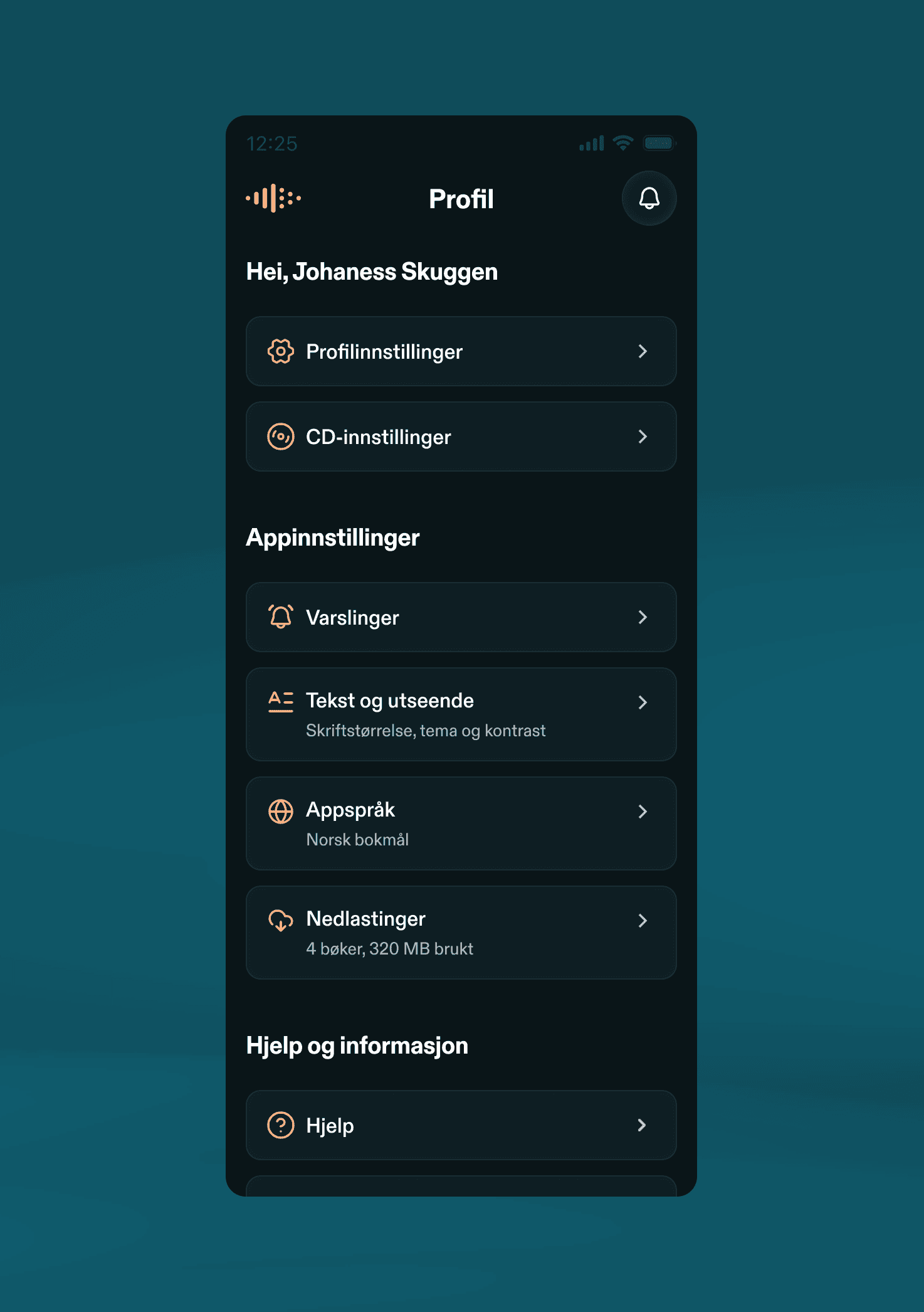
Grouping account, app and accessibility settings in one place
Grouping account, app and accessibility settings in one place


Keeping key book actions easy to reach
Keeping key book actions easy to reach
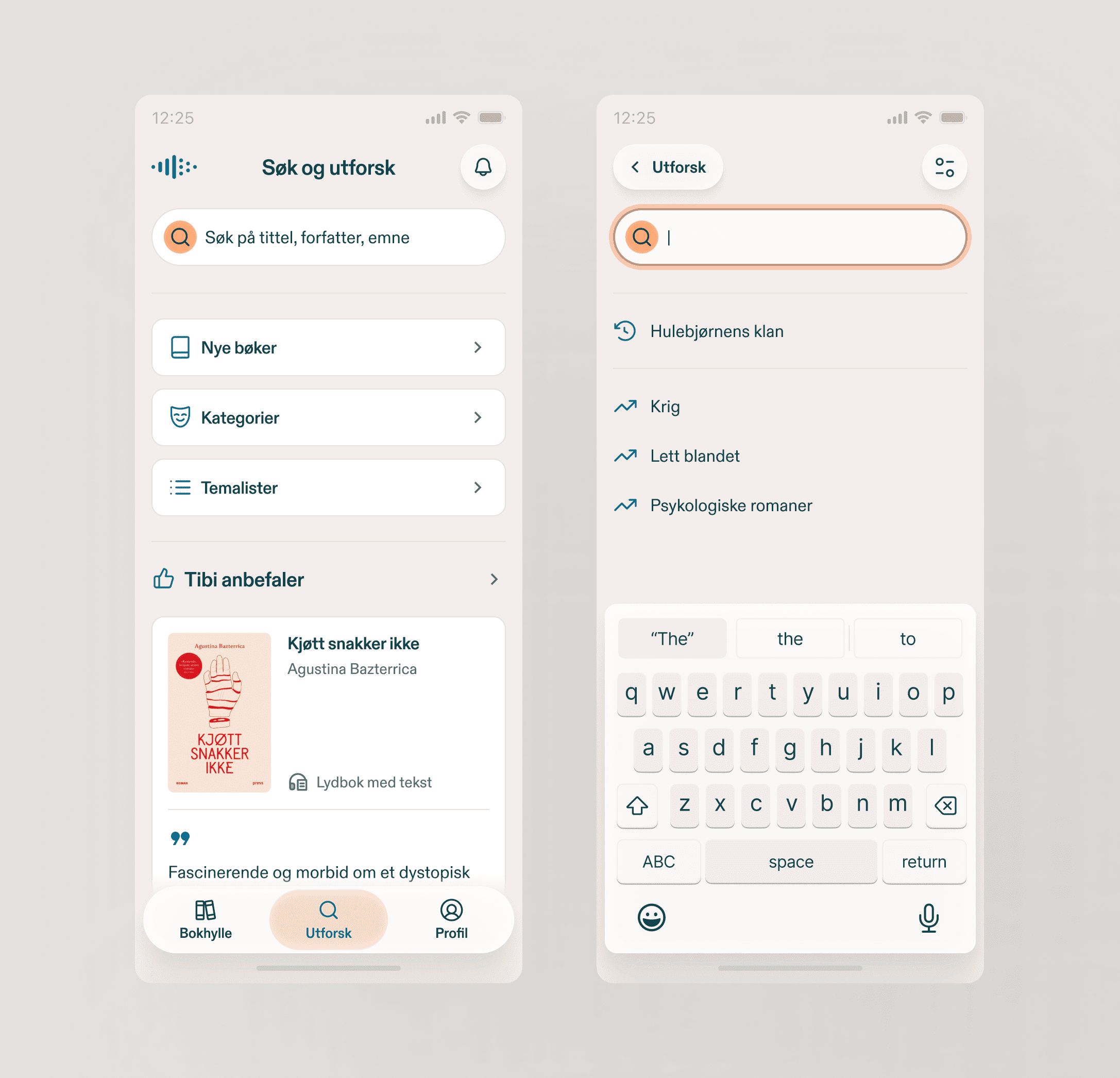
Bringing search and discovery together in light mode
Bringing search and discovery together in light mode

Showing clear feedback when a search returns no results
Showing clear feedback when a search returns no results


Creating a helper character as part of the visual language
Creating a helper character as part of the visual language
Ongoing
Ongoing
Ongoing
Ongoing
User testing and refinement
User testing and refinement
User testing and refinement
User testing and refinement
2027
2027
2027
2027
2027
Planned app launch
Planned app launch
Planned app launch
Planned app launch

Tıme to hit
pause,
see you soon
Tıme to hit
pause,
see you soon
Tıme to hit
pause,
see you soon
Tıme to hit
pause,
see you soon
Tıme to hit
pause,
see you soon